Challenge #1
class Scoreboard {

    private int team1Score;
    private int team2Score;
    private String team1Name;
    private String team2Name;
    private boolean isTeam1Turn;

    public Scoreboard(String team1Name, String team2Name) {

        this.team1Name = team1Name;
        this.team2Name = team2Name;
        this.team1Score = 0;
        this.team2Score = 0;
        this.isTeam1Turn = true;
    }

    public void recordPlay(int points) {
        if (points == 0) {
            isTeam1Turn = !isTeam1Turn;
        } else {
            if (isTeam1Turn) {
                team1Score += points;
            } else {
                team2Score += points;
            }
        }
    }

    public String getScore() {
        // Create the getScore Method HERE

        return team1Score + "-" + team2Score + "-" + (isTeam1Turn ? team1Name : team2Name);
    }
}

// Testing the Scoreboard class (DO NOT MODIFY this part unless you change the class, method, or constructer names)
// DO NOT MODIFY BELOW THIS LINE
class Main {
    public static void main(String[] args) {
        String info;

        // Step 1: Create a new Scoreboard for "Red" vs "Blue"
        Scoreboard game = new Scoreboard("Red", "Blue");

        // Step 2
        info = game.getScore();                  // "0-0-Red"
        System.out.println("(Step 2) info = " + info);

        // Step 3
        game.recordPlay(1);

        // Step 4
        info = game.getScore();                  // "1-0-Red"
        System.out.println("(Step 4) info = " + info);

        // Step 5
        game.recordPlay(0);

        // Step 6
        info = game.getScore();                  // "1-0-Blue"
        System.out.println("(Step 6) info = " + info);

        // Step 7 (repeated call to show no change)
        info = game.getScore();                  // still "1-0-Blue"
        System.out.println("(Step 7) info = " + info);

        // Step 8
        game.recordPlay(3);

        // Step 9
        info = game.getScore();                  // "1-3-Blue"
        System.out.println("(Step 9) info = " + info);

        // Step 10
        game.recordPlay(1);

        // Step 11
        game.recordPlay(0);

        // Step 12
        info = game.getScore();                  // "1-4-Red"
        System.out.println("(Step 12) info = " + info);

        // Step 13
        game.recordPlay(0);

        // Step 14
        game.recordPlay(4);

        // Step 15
        game.recordPlay(0);

        // Step 16
        info = game.getScore();                  // "1-8-Red"
        System.out.println("(Step 16) info = " + info);

        // Step 17: Create an independent Scoreboard
        Scoreboard match = new Scoreboard("Lions", "Tigers");

        // Step 18
        info = match.getScore();                 // "0-0-Lions"
        System.out.println("(Step 18) match info = " + info);

        // Step 19: Verify the original game is unchanged
        info = game.getScore();                  // "1-8-Red"
        System.out.println("(Step 19) game info = " + info);
    }
}

Main.main(null);
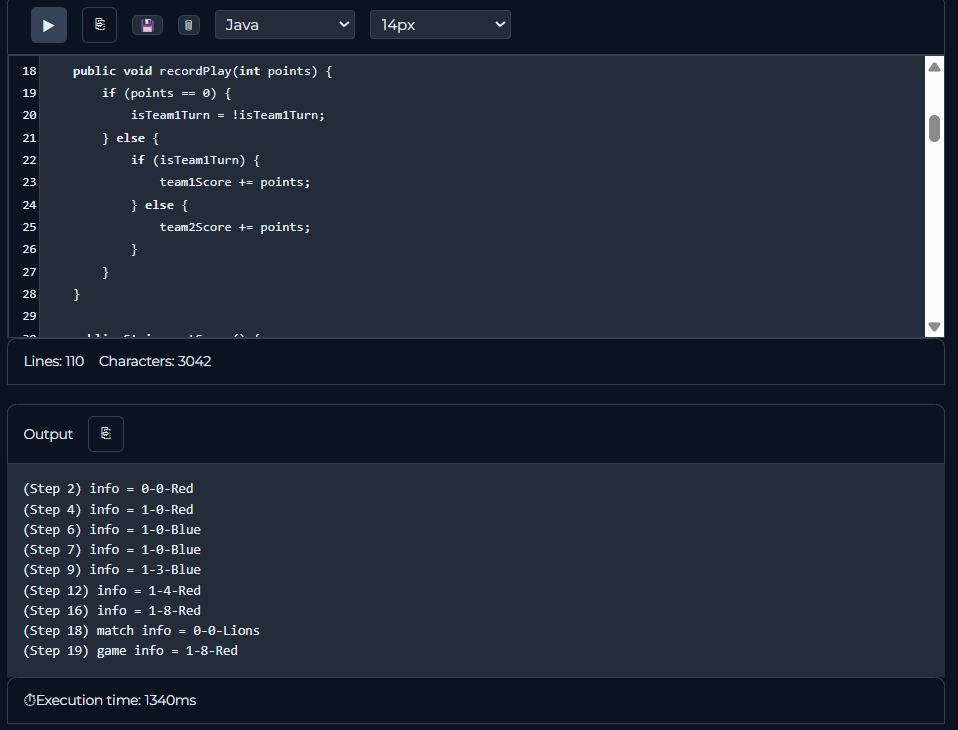
(Step 2) info = 0-0-Red
(Step 4) info = 1-0-Red
(Step 6) info = 1-0-Blue
(Step 7) info = 1-0-Blue
(Step 9) info = 1-3-Blue
(Step 12) info = 1-4-Red
(Step 16) info = 1-8-Red
(Step 18) match info = 0-0-Lions
(Step 19) game info = 1-8-Red
How I Solved it
The first step I took in solving this problem was to decide what properties the class would need.
I went through the instructions step-by-step. The first thing I read was that the constructor required two parameters, a string for the name of team 1 and a string for the name of team 2. I initialized these string properties at the top of the class and then assigned them to values in the constructor.
Then, I noticed that I needed to implement a feature that would switch between active teams. I thought the easiest way to do this was to create a boolean, because there’s only two possible things that could happen: either team 1 is active, or team 2 is active. So, I added a boolean property called isTeam1Turn, which is initially true but will change later on.
Finally, I noticed that I needed a system to keep points. Since the points are integers, I initialized two integer variables for the score of each team.
The next step I took was to create the recordPlay() method. I noticed that the method should do something differently whether the argument is 0 or if it is a positive integer. So, I first made an in statement to check if the argument was equal to zero. If it is, then I would change which team’s turn it is. Otherwise, I would add the points to the active team’s score. I did this by using another if statement to see which team’s turn it was, and then adding the points to the respectiv variable.
Lastly, I created the getScore() method. This one was easy because it was just string manipulation. All I had to do was separate each team’s score with a hyphen. I used a ternary at the end to see which team is currently active, and then append that team’s name to the end of the string.
Area of Struggle
I initially didn’t understand that there was a special case for if the point value was zero. Initially, I didn’t have an if statement that checked what the point value is. My recordPlay() method looked like this:
public void recordPlay(int points) {
    if (isTeam1Turn) {
        team1Score += points;
    } else {
        team2Score += points;
    }
}
This caused a huge logic error because the active team never switched. Ideally, if the team scored no points, then it should switch over to the active team. When I ran the code which each test case, I noticed that the second team never scored any points:
(Step 2) info = 0-0-Red
(Step 4) info = 1-0-Red
(Step 6) info = 1-0-Red
(Step 7) info = 1-0-Red
(Step 9) info = 4-0-Red
(Step 12) info = 5-0-Red
(Step 16) info = 9-0-Red
(Step 18) match info = 0-0-Lions
(Step 19) game info = 9-0-Red
I then realized I had to implement the if statement to switch active teams.
Final result
My output:
(Step 2) info = 0-0-Red
(Step 4) info = 1-0-Red
(Step 6) info = 1-0-Blue
(Step 7) info = 1-0-Blue
(Step 9) info = 1-3-Blue
(Step 12) info = 1-4-Red
(Step 16) info = 1-8-Red
(Step 18) match info = 0-0-Lions
(Step 19) game info = 1-8-Red
Expected output:
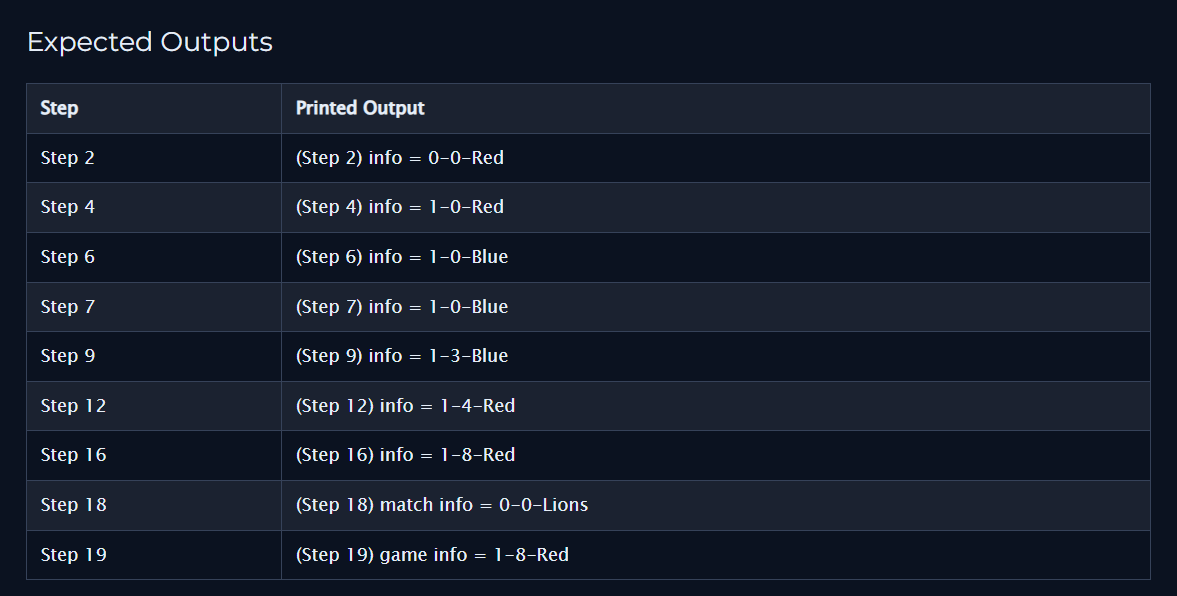
Everything matched up!
Coderunner proof